FluentBit
Fluent Bit is an open-source telemetry agent specifically designed to efficiently handle the challenges of collecting and processing telemetry data across a wide range of environments, from constrained systems to complex cloud infrastructures.
Concepts and Data Pipeline
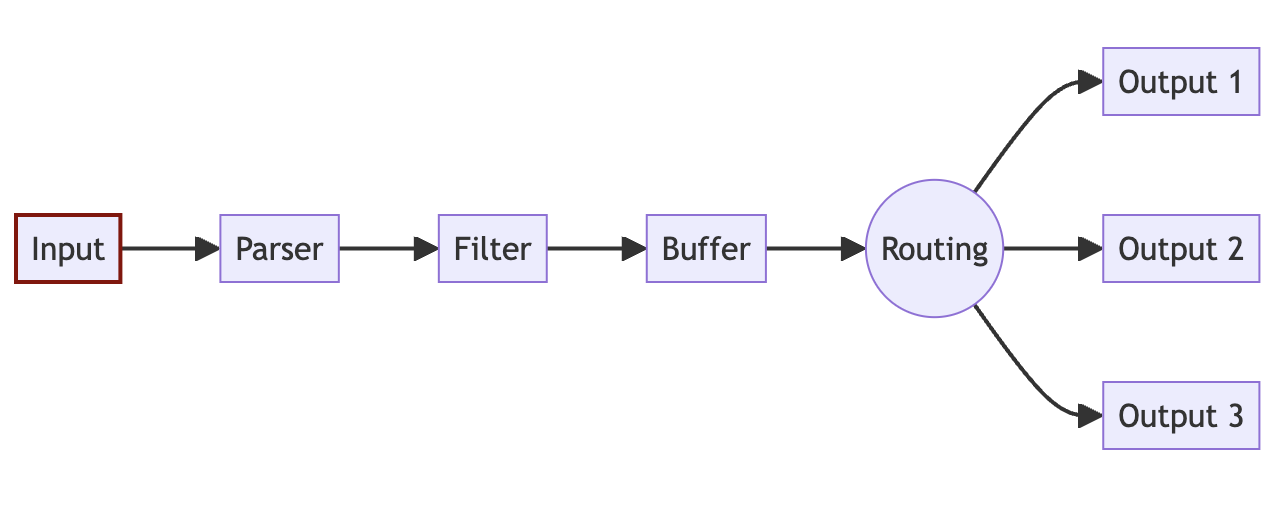
INPUT
The source of the data. Every INPUT source must have a Tag property. The Tag property creates an internal instance in FluentBit which allows you to connect the rest of the steps of the pipeline to each other. The below input tails a file and adds a tag called argoaudit. More inputs can be found here https://docs.fluentbit.io/manual/pipeline/inputs
[INPUT]
        Name tail
        Parser customargoparser
        Path /var/log/containers/minority-argocd-server-*.log
        Tag argoaudit
        Mem_Buf_Limit 5MB
        Skip_Long_Lines On
PARSER
Parser parses the input data from unstructured to structured format OR modifies a structured data sources. As different log inputs can have different formats, the parser allows you to create data readable for outputs. You can use a number of readily available parsers OR use custom regex to parse your data. Below example uses a custom regex for custom parsing.
Reading on parsers can be found here
https://docs.fluentbit.io/manual/pipeline/parsers
List of available parsers can be found here
https://github.com/fluent/fluent-bit/blob/master/conf/parsers.conf
[PARSER]
        Name customargoparser
        Format regex
        Regex ^(?<time>[^ ]+) (?<stream>stdout|stderr) (?<logtag>[^ ]*) (?<message>.*)$
        Time_Key    time
        Time_Format %Y-%m-%dT%H:%M:%S.%L%z
        Time_Keep   On
        Decode_Field_As json message
FILTER
Filtering allows you to alter the data before delivering it to its destination. You can use a number of readily available filters or use lua scripting to custom modify. You can use available filters to add kubernetes meta data etc. Below example uses custom lua scripting. List of available filters can be found here https://docs.fluentbit.io/manual/pipeline/filters
[FILTER]
        Name lua
        Match argoaudit
        script /fluent-bit/scripts/filter_example.lua
        call filter
filter_example.lua:
function filter(tag, timestamp, record)
        record["RawData"] = record["message"]["msg"]
        record["Application"] = "LogGenerator"
        record["Time"] = record["message"]["time"]
        record["msg"] = record["message"]["msg"]
        record["level"] = record["message"]["level"]
        record["entity"] = record["message"]["span.kind"]
        record["system"] = record["message"]["system"]
        record["operation"] = record["message"]["grpc.method"]
        record["claims"] = record["message"]["grpc.request.claims"]
        if record["message"]["grpc.request.content"] and record["message"]["grpc.request.content"]["name"] then
            record["app"] = record["message"]["grpc.request.content"]["name"]
        end
        record["access_time"] = record["message"]["grpc.start_time"]
        return 1, timestamp, record
end
BUFFER
When Fluent Bit processes data, it uses the system memory (heap) as a primary and temporary place to store the record logs before they get delivered, in this private memory area the records are processed.
Buffering refers to the ability to store the records somewhere, and while they are processed and delivered, still be able to store more. Buffering in memory is the fastest mechanism, but there are certain scenarios where it requires special strategies to deal with backpressure, data safety or reduce memory consumption by the service in constrained environments.
Fluent Bit as buffering strategies go, offers a primary buffering mechanism in memory and an optional secondary one using the file system. With this hybrid solution you can accommodate any use case safely and keep a high performance while processing your data. More reading here https://docs.fluentbit.io/manual/administration/buffering-and-storagea
ROUTING
There are two important concepts in Routing:
- Tag
- Match
When the data is generated by the input plugins, it comes with a Tag (most of the time the Tag is configured manually), the Tag is a human-readable indicator that helps to identify the data source.
In order to define where the data should be routed, a Match rule must be specified in the output configuration.
## OUTPUT
The output interface allows us to define the destination for the data. You can define multiple outputs for a given input. You must match the output to the tag of the input in order to link the output to the input. There are many output connectors available out of the box. You can find the list of outputs here https://docs.fluentbit.io/manual/pipeline/outputs
Below example sends the data for above input to 2 outputs - Blob storage and Elastic.
[OUTPUT]
        Name  azure_blob
        Match argoaudit
        account_name devauditstorageac
        shared_key ***
        path argocd
        container_name logs
        auto_create_container on
        tls on
[OUTPUT]
        Name es
        Match argoaudit
        Host audit-log.es.us-central1.gcp.cloud.es.io
        HTTP_User ***
        HTTP_Passwd ***
        Port 9243
        Logstash_Format On
        Logstash_Prefix dev-argocd
        Suppress_Type_Name On
        tls On
TIPS FOR DEBUGGING
The most common issue you will face is the data format while sending to destination and you might end up spending some time on filtering the data. To debug this, you can have the below output enabled which will print the output to the fluent-bit stdout.
[OUTPUT]
        Name  stdout
        Match argoaudit