Migrating from ADO to github
GitHub Repository and Workflow Migration Guide
This guide walks you through the process of migrating repositories and pipelines (workflows) from Azure DevOps (ADO) to GitHub.
1. Migrate Repository from ADO to GitHub
Notify your team about your intentions to migrate the repository.
2. Migrate Repository from ADO to GitHub
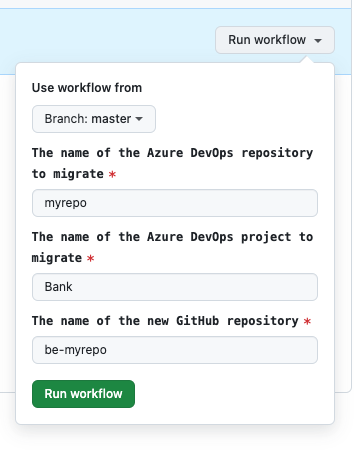
We created a pipeline to migrate your repository to GitHub.
You can trigger use it here
3. Configure your GitHub repository
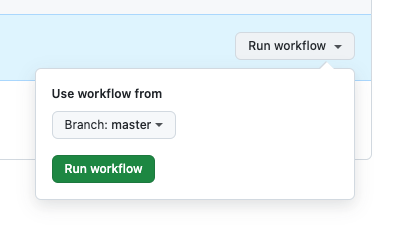
We created a pipeline to configure automatically every morning backend repositories.
You can trigger it manually here

4. Update your service Argo CD app to use GitHub
5. Create migration Pull Request to start deploying from GitHub
Note: Step 7-8 below also includes updates to your new github repo. You can include them in the same PR, so you don't have to ask for reviews multiple times.
In your new GitHub repository, create a new branch and includes these changes:
<PackageReference Include="Microsoft.SourceLink.AzureRepos.Git" Version="8.0.0">
   ...
</PackageReference>
  name: be-kyc-pr   # <-- replace with <your-repo-name>-pr

  on:
    pull_request:
      branches:
        - 'master'
    workflow_dispatch:

  jobs:
    run-pr-build:
      permissions:
        contents: write
        actions: write
        checks: write
        packages: read
      uses: majority-dev/be-cicd/.github/workflows/pr_pipeline_github.yml@master
      with:
        solutionPath: 'Minority/Minority.Bank.sln' # <-- replace with your sln path
        area: 'Minority.IdologyKyc'  # <- replace with your area name
        buildDb: true
        dbName: 'MinorityIdologyKyc' # <- replace with your DB name
      secrets: inherit
name: cicd

permissions:
  contents: read
  packages: write
  attestations: write
  pull-requests: write
  actions: read
  checks: write

on:
  workflow_dispatch:
  push:
    branches:
      - master

jobs:
  use-template:
    uses: majority-dev/be-cicd/.github/workflows/cicd.yaml@master
    secrets: inherit
    with:
      projects: '["Minority.Check.Api", "Minority.Check.Service"]' # <- Replace with your list of projects, make sure to define this as a string
      rootfolder: Minority
      area: Minority.Check  # <- replace with your area nema
      packageFilter: ''
      appName: bank-check  # <- replace with your app name
      dbDeploy: true
      #dbNameOverride: 'mf-remittance'
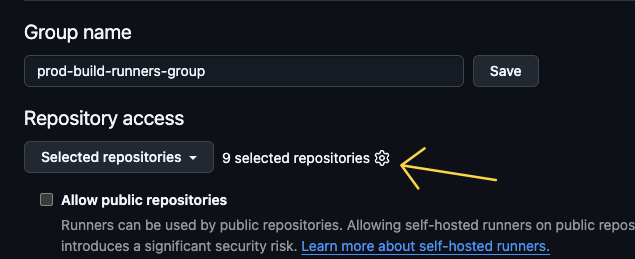
6. Ask Managers or Platform team to whitelist your repo for deploying to prod
Procedure:
- Go to this GitHub Organization settings page
- Click on wheels button and select the new service repo to allow
7. Update your service to our GitHub Renovate
Update renovate.json file to refer to the new shared renovate configuration file hosted in GitHub.
"extends": ["github>majority-dev/be-cicd//renovate/dotnet-config"]
Add GitHub package source to nuget.config. It will indicate Renovate to check our GitHub packages repository when searching for new versions.
Add this first in the list of packageSources to make it the default in VS package browser
<add key="github" value="https://nuget.pkg.github.com/majority-dev/index.json" />
7.1 Update user secrets
User secrets need to be updated to use be- instead of bank- see this pr for reference https://github.com/majority-dev/be-auditing/pull/479/files
Remember to run Initialize-UserSecrets for the area afterwards.
8. Cleanup
- Delete the .azure-devops folder in your GitHub repository
- Ask managers to disable the repository in Azure DevOps
9. How to pull GitHub packages locally
- (Step already done for Renovate) Add GitHub package source to
nuget.config. It will indicate Renovate to check our GitHub packages repository when searching for new versions.
<add key="github" value="https://nuget.pkg.github.com/majority-dev/index.json" />
- Install GitHub CLI (https://cli.github.com/manual/)
- Login to GitHub via the cli tool (gh auth login --scopes read:packages)
- Get GitHub oauth token ( gh auth token)
- In Visual Studio, enter your GitHub username and token for password