Using Postman for Ad-Hoc and Exploratory Testing
When performing ad-hoc or exploratory testing, you often need to quickly inspect API responses, adjust payloads on the fly, or work with multiple endpoints—including internal testing APIs. Postman is an excellent tool to help streamline these tasks.
For a smooth testing process, we have provided two login collections—STEP1 and STEP2—in our workspace. Important: Do not modify these collections.
Getting Started
1. Access the Workspace
- Workspace Name: Backend API Testing
- Action: Ask your manager for an invitation to the workspace.
2. Configure Your Test Environment
- User Setup:
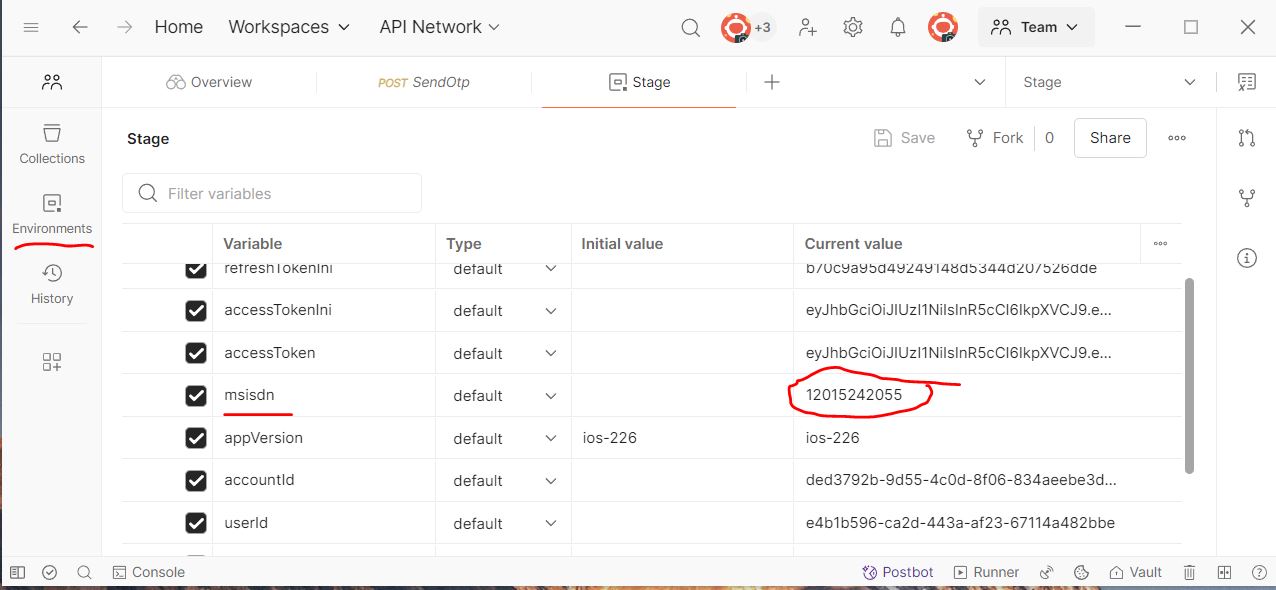
* Your test user number will be used as the currentmsisdnvalue in the stage environment (see screenshot below).
* Note: You must still create the user using the regression test methodCreateUserPassKyc()or using$ majority-cli --pass-kycto run the scripts which Alex created. - Environment Page:
3. Run the Login Collections
- Step A: Set the default environment to
Stageusing the environment selector at the top right of Postman. - Step B: Run the collections in this order:
1.STEP1
2.STEP2 - Result: After running these collections, you will be logged in. The generated token is valid for 7 days, and the
accessToken,accountIdanduserIdin the stage environment will be updated automatically.
Testing APIs
Option 1: Importing Swagger to Postman
-
Download Swagger File:
Download the Swagger file in JSON format. -
Import to Postman:
Import the JSON file into Postman. -
Configure Authorization:
* Right-click the imported collection.
* Change the Authorization type toBearer Token.
* Set the token value to{{accessToken}}. - Add Pre-request Script:
* In the collection's Scripts tab, add the following code to the Pre-request section:pm.request.headers.add({ key: 'x-app-version', value: '{{appVersion}}' });
5. Set Request Authorization:
* For each request in the collection, set the Authorization type to Inherit auth from parent.
6. Send Requests:
You can now send requests and receive the correct responses.
Option 2: Single API Testing
* Update the URI based on the Swagger documentation.
* Add the appropriate payload body.
* Ensure you set the Authorization type to Bearer Token and assign the token to {{accessToken}}.
Access Internal Testing API
* Update the URI based on the Swagger documentation.
* Use API key for authorization.
* Example: The Creidt100 request is for internal testing API access.
Two Examples of Postman Test Collections
- Payment Request: Instruction of Payment Request Test Collections
- MPay to Anyone: Instruction of Mpay to Anyone Test Collections