What TransferLink is
A way for a sender to pre-authorize funds and generate a shareable link so the beneficiary can provide details and claim the money. The link has its own lifecycle (Pending → Claimed/Cancelled/Expired/Failed).
Public API surface
Service contract exposes end-to-end operations (create, get, claim, cancel, requirements, validation):
API controller exposes create/cancel to clients; it passes context (senderId, appVersion, applicationId) and maps contracts:
Status enum:
public enum TransferLinkStatus
{
    Pending = 1,
    Claimed = 2,
    Cancelled = 3,
    Expired = 4,
    Failed = 5,
}
Persistence model and repository
Entity stored in DB:
TransferLinkEntity
Service behavior (business logic)
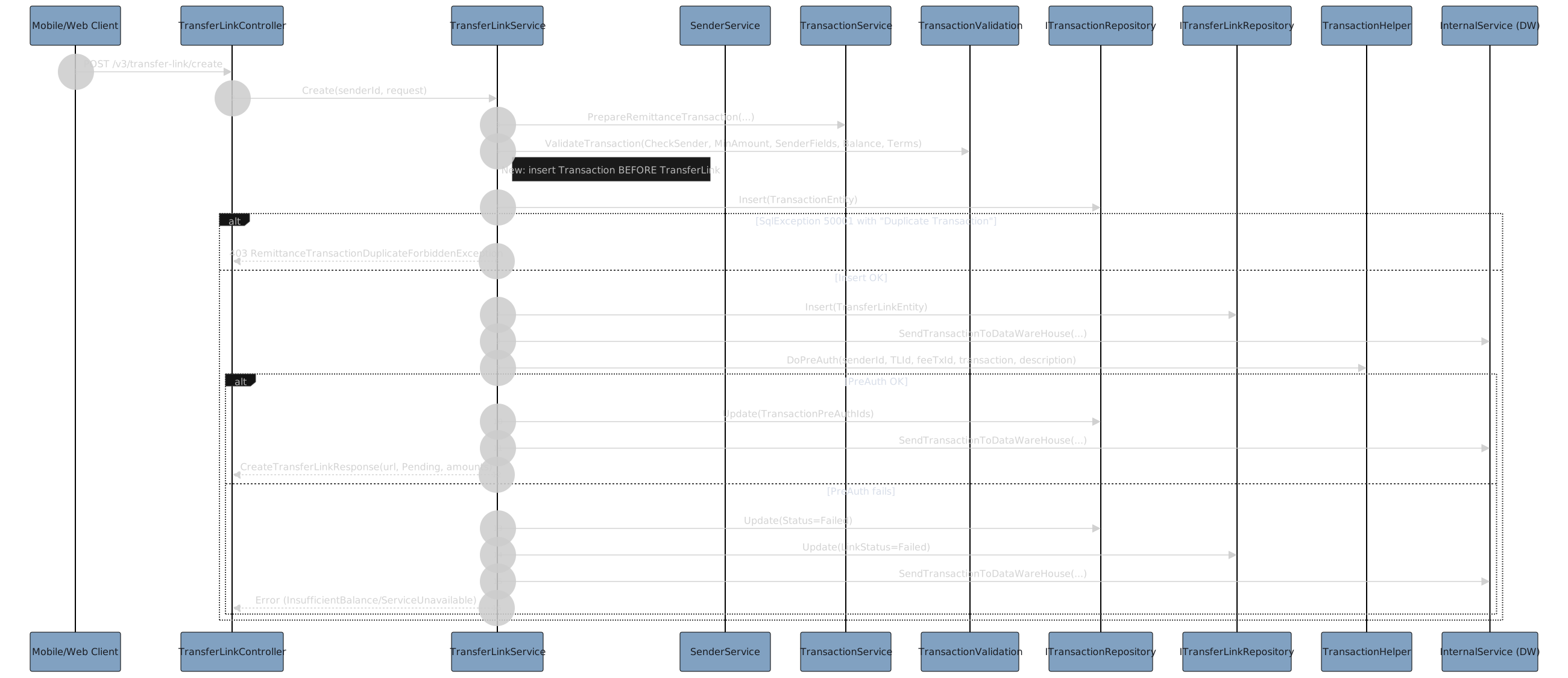
Create a link
- Validates sender and amounts,
- prepares a transaction,
- inserts both link and transaction,
- sends event to DW,
- pre-authorizes funds,
- builds URL localized by language,
- returns response:
URL formation and expiry window:
var transferLinkEntity = new TransferLinkEntity
{
    ExpirationDate = DateTime.UtcNow.AddHours(_configuration.TransferLinkExpiryHours).Date,
    TransferLinkUrl = _configuration.TransferLinkBaseUrl + (isSpanish ? "es" : "en") + "/t?transferLinkId=" + transferLinkId,
    ...
};
Sequence Digram for Create a Link
Get a link (rich view)
- Loads TL + transaction + sender,
- checks expiry/status,
- validates sender risk,
- attaches latest FX quote and promo-adjusted receive amount:
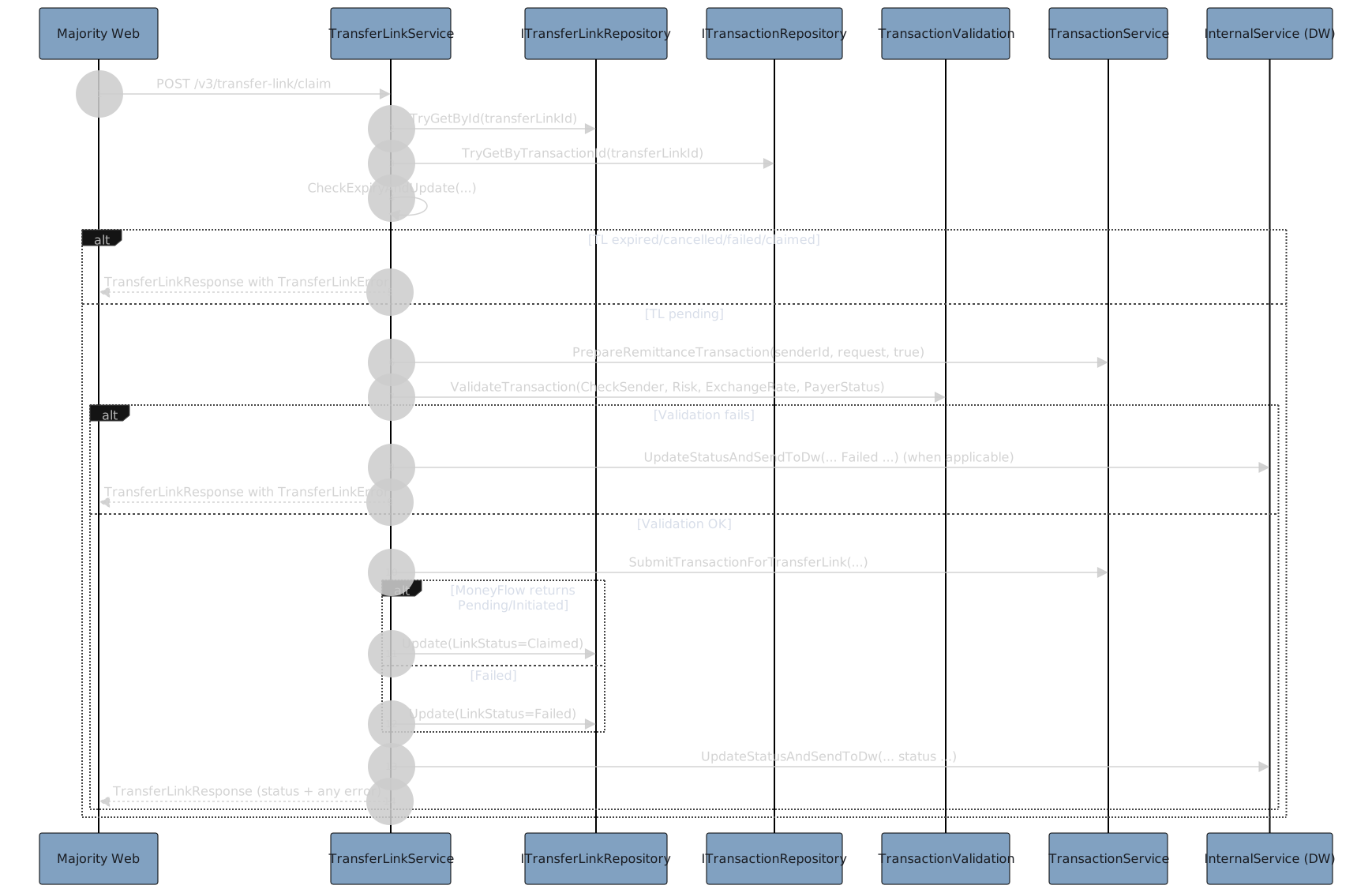
Claim a link
- Ensures not expired/cancelled/failed/already claimed;
- optionally deserializes beneficiary object;
- prepares a transaction using values from the pre-created TL transaction;
- validates (sender, risk, FX, payer);
- submits via TransactionService;
- sets TL status to Claimed on success, Failed otherwise;
- updates SmsConsent and DW:
Sequence Diagram for Claim a link
Cancel a link
- Only when Pending;
- if transaction already finalized, infer Claimed/Cancelled; otherwise set Cancelled or Expired based on current time;
- update and send to DW:
Beneficiary flow for web (validate and add)
- Validates OFAC and account number (country-specific), returns web-tailored requirement fields;
- on success adds beneficiary and associates with TL transaction:
Internal helpers
- Expiry check updates both TL and transaction status and may finalize reserved funds if failed/canceled
End-to-end flow in simple terms
Create:
- Sender chooses country/currency/amounts;
- system validates and reserves funds;
- a link is created with an expiration date and URL.
- The transaction is staged to be finalized later when claimed.
Share:
- Sender shares the link with the beneficiary;
- status shows “Share the link” and “Pending - X days left”.
Beneficiary fills details:
- Web calls account requirements and ValidateBeneficiary to verify OFAC and account details.
- Errors provide precise messages or additional fields to collect.
Claim:
- If valid and not expired/cancelled/failed, the system submits the transaction to MoneyFlow and marks the link Claimed;
- otherwise marks Failed and returns a user-friendly error.
Cancel/Expire:
- Sender can cancel while pending;
- background processes can pick up expiring/expired links. When canceled/expired/failure, holds are finalized/refunded and statuses are sent to DW.