Transaction Processing Flows
Transaction Categories
We devide transactions into two main categories, which helps us decide which flow will be used and which action will be executed.
1. Managed Transactions
Managed transactions are the ones which are initiated by our backend. This include Calling, MobileTopUp, Remittance, Subscription etc. We call them managed transactions because their whole lifecycle is managed by us. We control their initiation and completion steps.
2. Unmanaged Transactions
Unmanaged transactions are usually not initiated by us. Some examples are PosPurchase, ATM Withdrawals and Direct Deposits. We don't always have a say in whether these transactions are allowed or not. Sometimes we can decide and sometimes we can only accept a transaction. Since we do not manage their whole lifecycle, we categorized them as unmanaged transactions.
This categorization of managed and unmanaged transactions helps us decide which events or code branches to process. For example, simplest example is loading transaction state when processing ledger callbacks. If transaction is managed then we will load transaction status from database and move it to Transaction table. But in-case of unmanaged transactions, this step is skipped, as wwe will not have any db record about them.
Unmanaged transactions are further split into two categories:
A. Authorized Transactions (AKA Network Transactions)
This category contains all transactions performed over payment networks, mostly via card like PosPurchse, Atm Withdrawal, e-commerce, Zelled etc. We usually have a option to decline these transaction requests, unless acquirer has specificaly requested a forced transaction. For forced transactions we can only accept them.
B. Non-Authorized Network or Ledger Transactions
Non-network transactions don't go through payment networks like VISA, MasterCard. Basically not network rails are involved. These can be initiated by us via support portals provided by various ledgers like Galileo Portal and I2c portal. These also include most transactions which are directly performed on account level instead of via card, like DirectDeposit and BankDebit. Various adjustments performed by Ledgers like balance adjustments also come under this category. We usually do not have any way to decline these transaction, except product and account level restriction.
Transaction Processing Overview****
There are two main steps involved during transaction processing.
- Transaction Initiation
- Transaction Completion
Transaction initiation step is different for Managed & Unmanaged transactions. But Transaction completion is same, so both types of transaction go through same code and usually perform same operations like publishing various events, updating firebase etc.
1. Managed Transaction Initiation
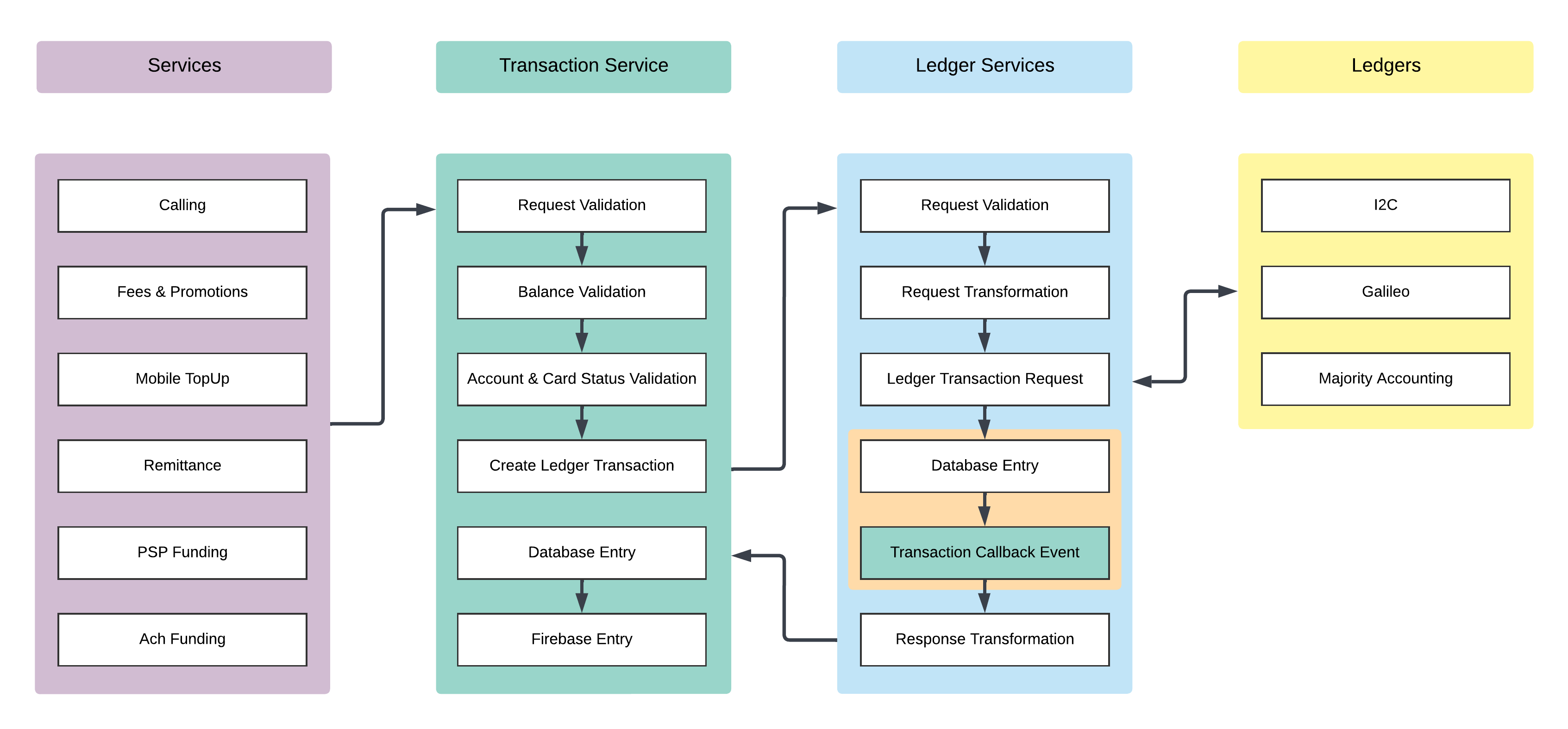
All Majority transaction request go through this step. Main purpose of this step is to just record every available transaction information and request ledgers to execute transaction request. This process will in-turn result in LedgerTransactionCallbackvent. Usually flow goes like this:
- Various Majority services call Transaction service to request certain types of transactions
- Transaction service converts these requests to a standard models understood by all our ledger services
- Ledger services then convert these standard model to ledger specific model and forward requests to Galileo, I2c etc.
- For Galileo and Majority Accounting, we also publish
LedgerTransactionCallbackventafter reciving response. But for I2c we just wait for callback request. - Ledger services will then respond to transaction service request with a standard response model
- Transaction service will record this transaction in Database and Firebase and also update balance in Firebase
- A response will be returned to actual service which requested this transaction. Response contains
TransactionId
After this whole process transaction initiation is complete, user's balance is updated and transaction also apears in Firebase. But transaction won't apear in Hydra as only completed tranasctions are shown there.
2. Unmanaged Transaction Initiation + Ledger Callback Processing
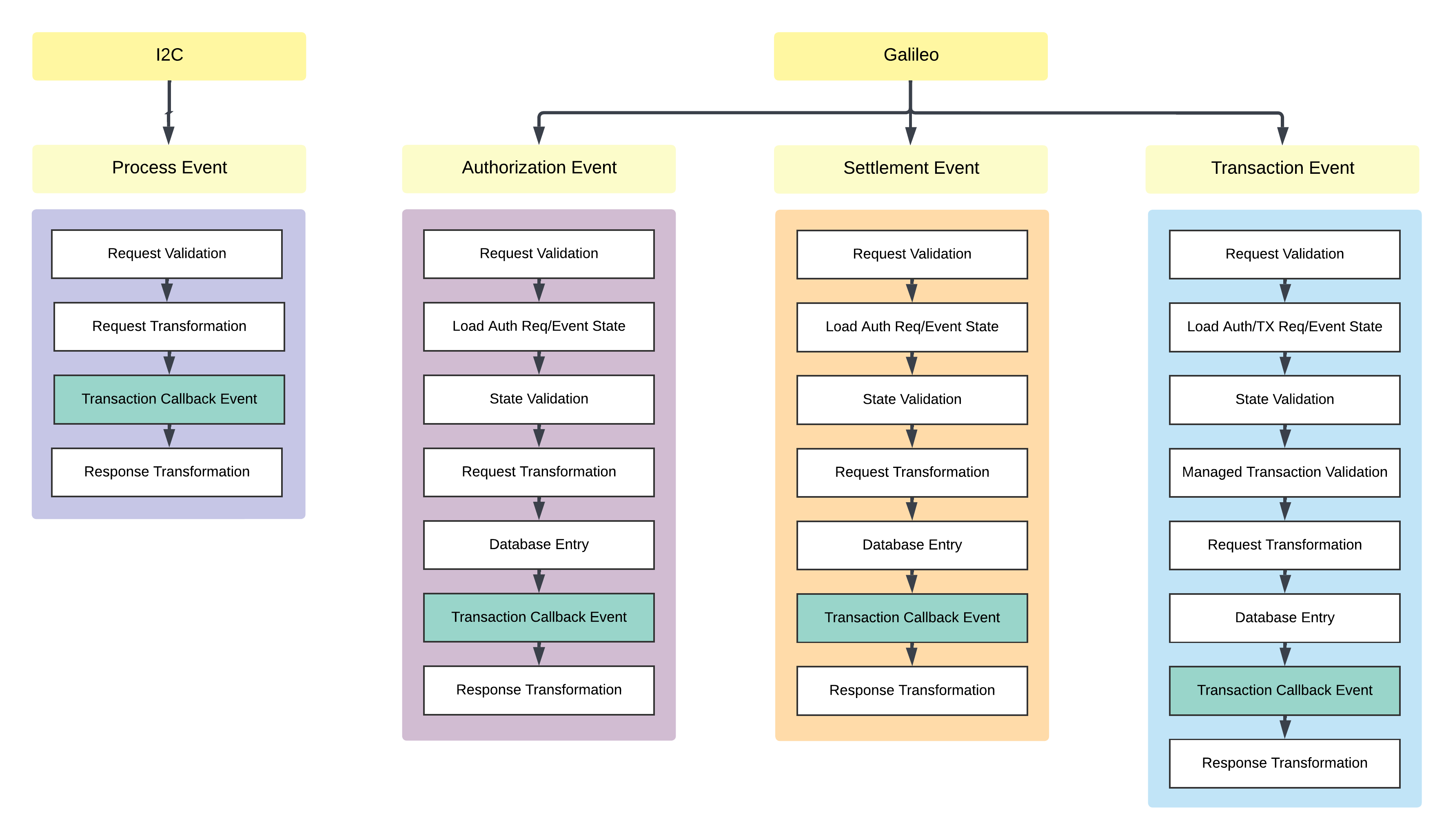
To handle initiation of unmanaged transaction we have configured some endpoints which are invoked by Ledgers like I2c and Galileo. These ledgers will send transaction information to us and then we will record them in our system. Main pupose here is again to publish LedgerTransactionCallbackMessage. Flow is slightly different for both I2c and Galileo.
A thing to keep in mind is that we will get callbacks for both managed and unmanaged transactions. But we will ignore callbacks for Galileo as we already published LedgerTransactionCallbackMessage, but for I2c this callback will be processed for both transaction categories and will result in same event.
I2c Callback Processing
I2c only has one endpoint and they provide pre-parsed tranasction payload, we don't really have to make too many transformations to incoming payload. This payload is transformed and sent as LedgerTransactionCallbackMessage to message bus. This flow is same for both managed and unmanaged transactions.
Galileo Callback Processing
Galileo events api provides three different endpoints for different types of events. /Authorization and /Settlement event endpoints are primarily related to Authorized transactions mentioned above. While /Transaction event endpoint is used for both managed transactions and non-authorization based transactions.
3. Transaction Completion
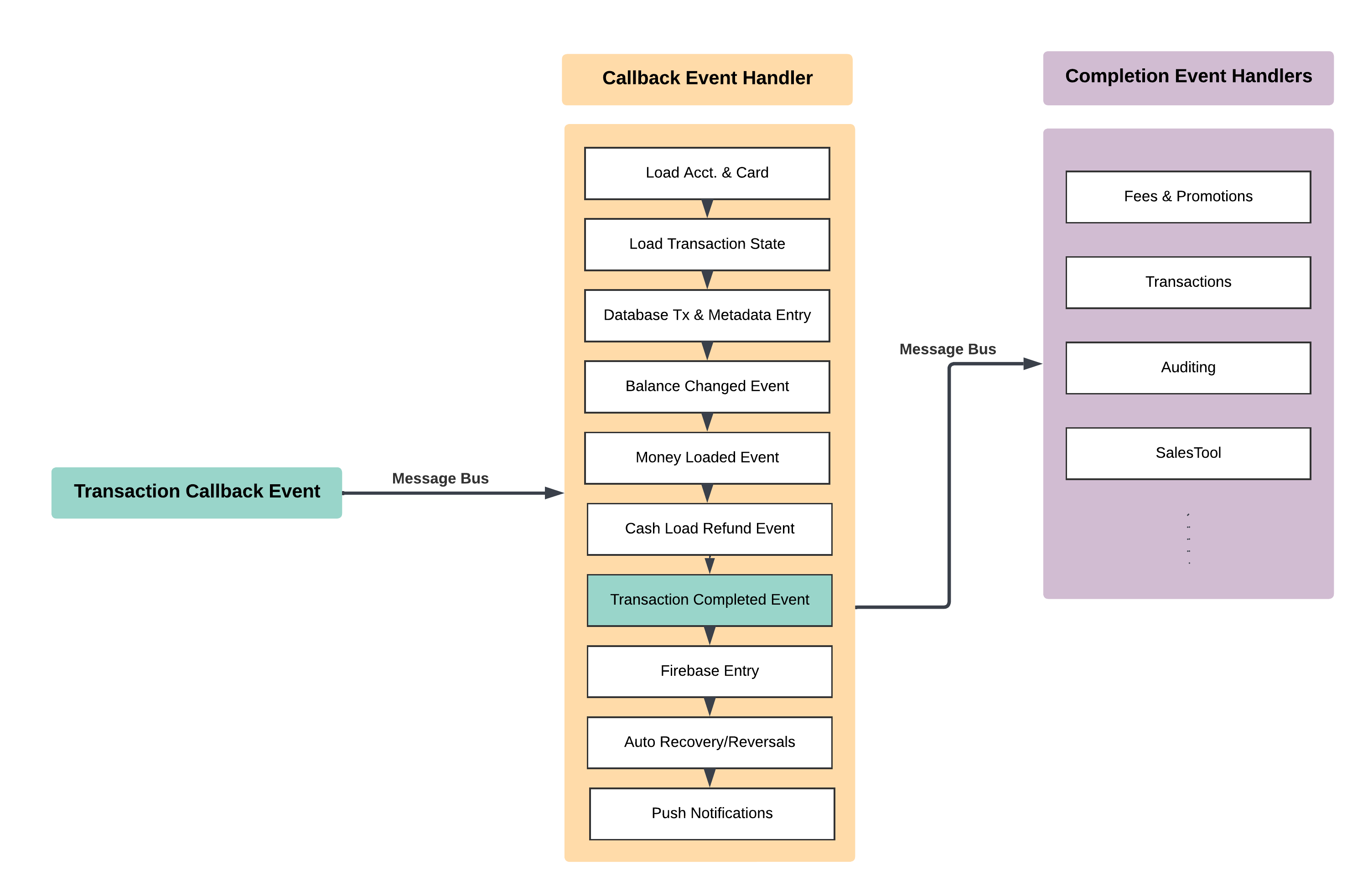
This is the final step in transaction processing and is triggered for every single financial transaction. Scheduled Transactions and Trial Subscription transactions will skip this step, as there's no financial impact of these. Trigger for this flow is previously mentioned LedgerTransactionCallbackMessage. When this event is triggered from various sources, it is handled by TransactionCallbackMessageHandler in Transaction Service. This message handler then perfoms various operations as mentioned below and shown in image.
- Find account and optionally a card which was used to perform transaction
- If transaction is maanged then we also need to load some information from InitiateTransaction table this includes
OwnerResourceIdandTransactionSubTypeetc. - Load rest of transaction state and try to figure out various metadata about it. Like finding if this is a reversal, preauth, partial reversal etc.
- Insert transaction record in database along with newly calculated transaction metadata.
- If LedgerBalance was changed, as it usually does for successful debit/credit transactions, throw
AvailableBalanceChangedEvent, This event was previously thrown for all changes to available balance, but we later switched to ledger balance logic. - If this was a credit transaction of select credit transaction type then publish MoneyLoaded event. This us usually handled by SalesTool
- We also had a feature for cash load based on some ATM withdrawal amount trigger. Later this was moved to Braze. But event is still being published.
- Publish
TransactionCompletedEvent. This event notfied all backend services, Datawarehouse, Braze and risk about this transaction - Update user's balance in firebase
- Insert/Update/Replace/Remove firebase record about this transaction.
- Send push notification to user for some transaction types. A few transaction types have custom push notifications being sent by respectives services. In that case transaction service will not send any notification.